Documentation
The MCP connector
Connect Brand Recon to Claude, ChatGPT or any MCP-compatible AI with one server URL and ask questions about your data in plain English.
Last updated:
October 20, 2026
The Brand Recon MCP connector lets an AI assistant read your Brand Recon data directly. Instead of clicking through dashboards, you ask a question, and the assistant pulls the figures, explains what changed and suggests what to do next. The connector is included on every plan.
Connect Brand Recon to your AI
- Open your AI assistant's settings and find where it manages connectors or MCP servers. In Claude, select Customize in the sidebar, then Connectors. In ChatGPT, select Plugins in the sidebar. Other assistants may call this custom connectors, MCP servers, apps or developer settings. Some workspace plans need an admin to allow custom connectors.
- Choose to add a custom connector. In Claude, select Add, then Add custom connector. In ChatGPT, select Add at the top right of the Plugins page, then Add custom MCP server.
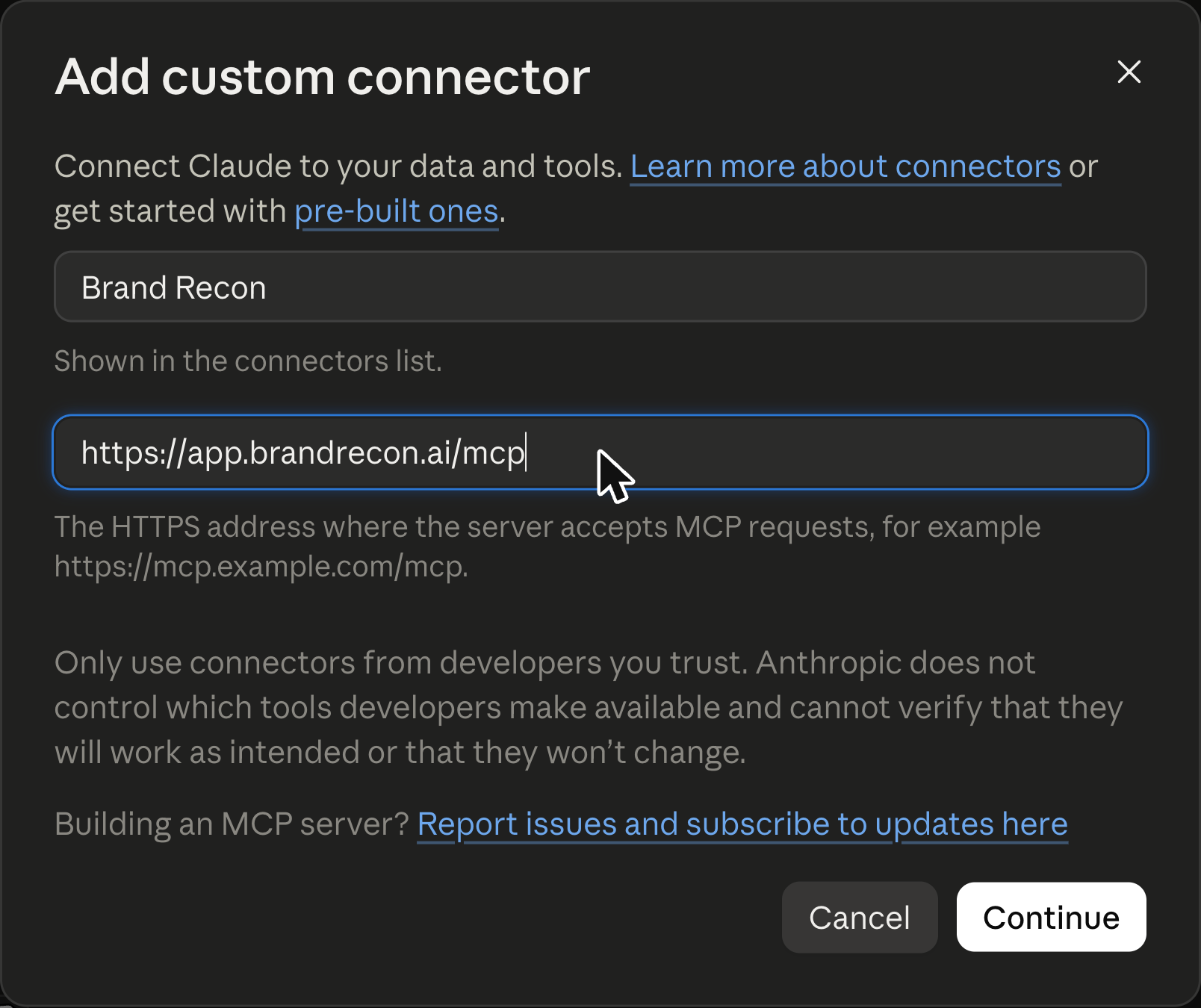
- Enter a name, such as Brand Recon, and the MCP server URL:
https://app.brandrecon.ai/mcp. In ChatGPT, paste the URL into Connection with Server URL selected, and leave Authentication set to OAuth. - Select Continue. In ChatGPT, tick I understand and want to continue, then select Create as a plugin. You are taken to a Brand Recon login page. Sign in with your email and password, or choose Continue with Google.
- On the Authorize App screen, confirm that Claude is requesting access to your Brand Recon account. It asks for offline access, so Claude can keep working with your data between sessions, and shows an External App notice asking you to check that you recognise the domain claude.ai. Select Accept.
- You return to Claude, which confirms that it is connected to Brand Recon. Start a new conversation, make sure the connector is switched on for it, and ask a question about your data.
The assistant can see the same projects you can see in the app. It can read:
- Your projects and their configuration: brand, competitors, topics and prompts (see Setting up your tracking)
- Dashboard metrics for any date range, with a comparison period
- Metrics by topic and by prompt, including each prompt's detail
- Citation share, the most cited domains and the most cited pages
- The raw AI responses behind the numbers
The connector reads data. It doesn't change your projects, prompts or settings. If you are new to the metrics it returns, Getting started defines each one.
Tool permissions. In Claude, open the Brand Recon connector from Customize, then Connectors, to see its 11 tools, such as dashboard metrics, citation share and raw responses. For each tool you can choose whether Claude may use it automatically, must ask you first, or is blocked from using it. The same page has a Disconnect button if you want to remove access.
Questions worth asking
The more specific the question, the more useful the answer. Name the project, the date range and the platform when they matter.
See what changed
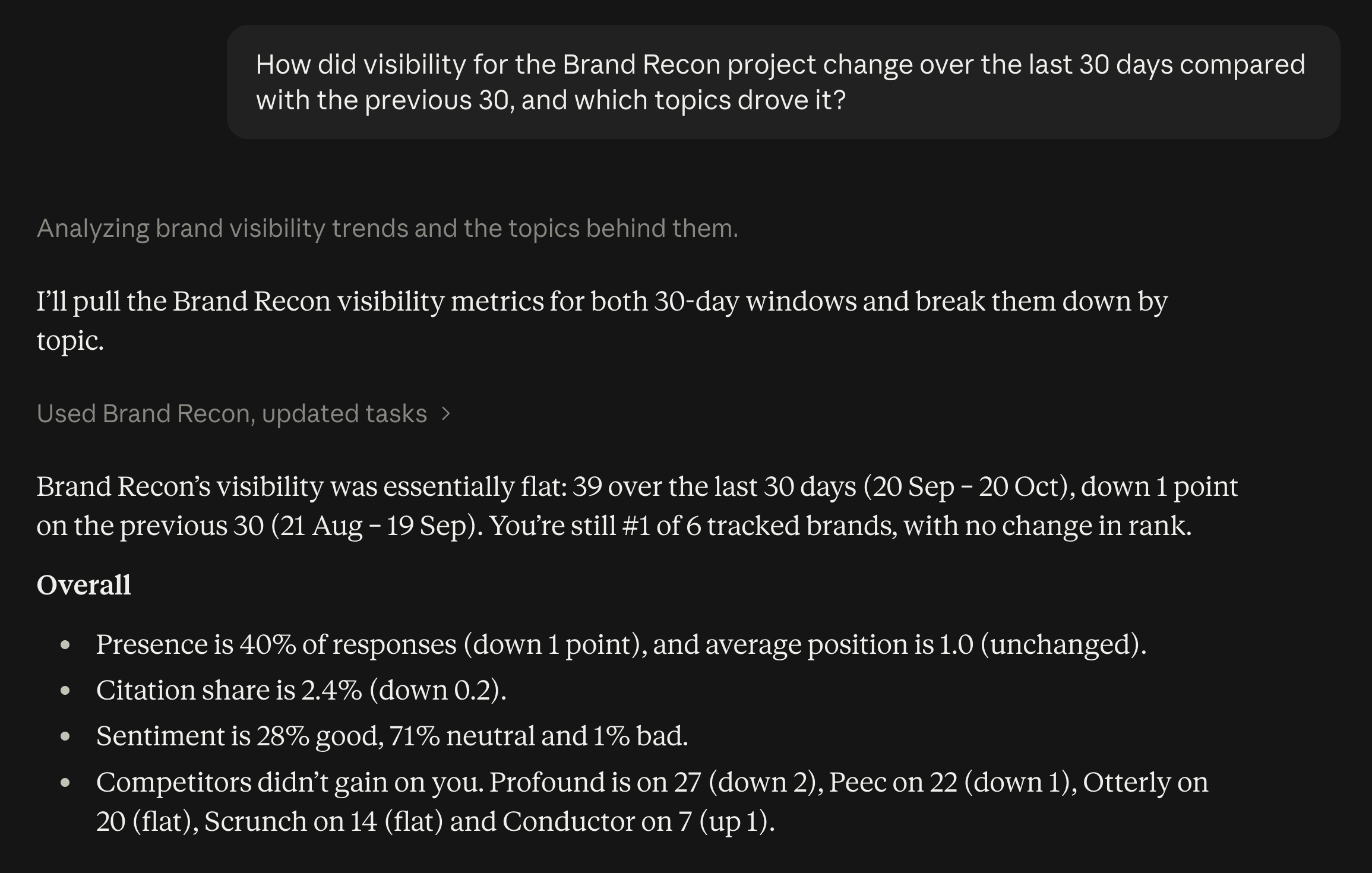
- "How did visibility for [project] change over the last 30 days compared with the previous 30, and which topics drove it?"
- "Which competitors gained the most ground this month?"
Find the gaps
- "Which topics have a visibility score of zero, and who ranks first in each?"
- "On which platform are we weakest, and which prompts explain it?"
- "Which frequently cited pages appear in answers that don't mention my brand?"
Understand the wording
- "Read the latest Claude responses to [prompt] and tell me how my brand is described."
- "Why is the sentiment negative for [topic]? Show me the responses."
Decide what to do
- "Based on this data, give me five specific pieces of content to create or update, in priority order."
- "Which domains should we try to get coverage on, and why?"
For a full monthly routine, see Taking action.
Tips for better answers
- Ask for the why as well as the what, then follow up with "what should we do about it?"
- Ask the assistant to show the prompts or responses behind any claim so you can check it.
- Treat a single day's movement with caution. Ask for trends over several weeks.